
Invoice run, account balance (balance).
Your information about the current billing cycle
This article describes functions related to the balance in your account. If your balance is negative, you will receive an email notification at the beginning of the month with the subject line: "Eponet AG Your information about the current billing cycle" and you will be asked to transfer the outstanding amount. You can find your balance and related functions in your account under Settings > Finances.
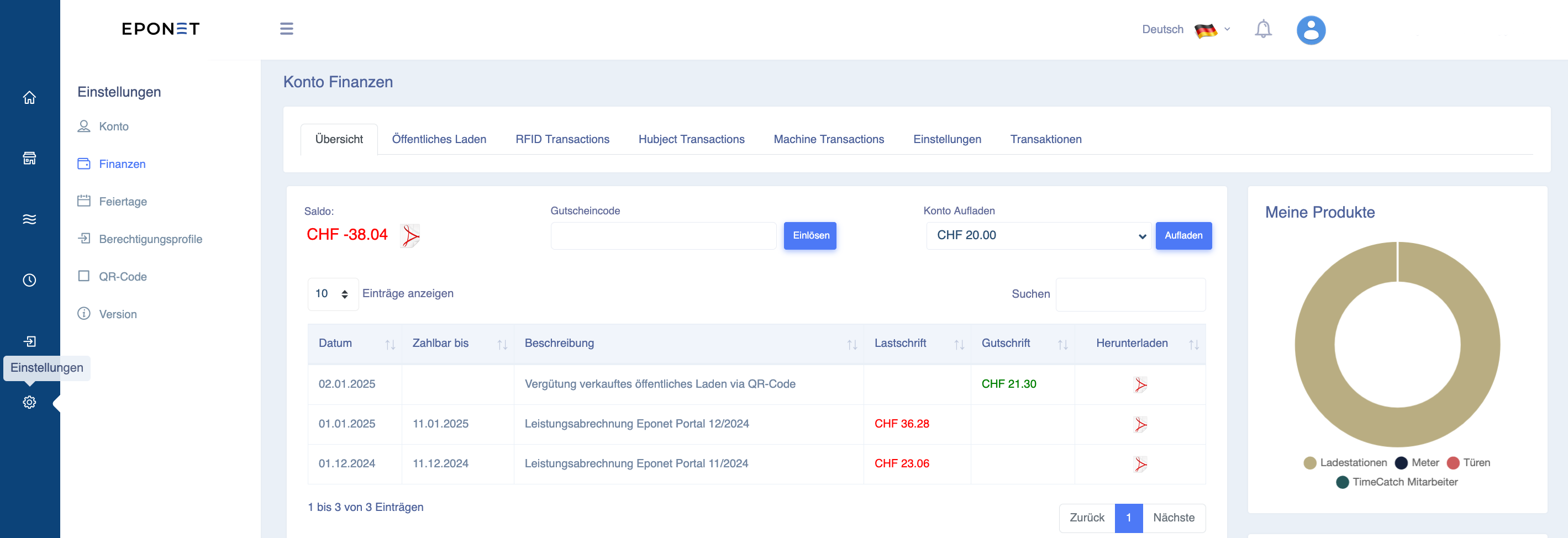
You can find Finances by selecting Settings from the blue page list on the left.
Here you will see your current balance in the overview.
If the balance is green, i.e. in credit, money can also be paid out. You can find this function under the "Transactions" tab. If the balance is red, i.e. in debit, a PDF icon will appear next to it where you can create a QR code EZ slip for the outstanding amount.
If you don't want to pay small amounts this way every month, you can also use the "Top up account" function on the right-hand side to deposit a larger amount, e.g. £200. By the way: if you don't use it, you can withdraw the desired amount at any time.
The table shows all account movements. Our service invoices are shown as debits and deposits or income from invoices (charging stations, machines, deposits) as credits. Details can be found as a PDF in the Download column.