
Schritt 5 - RFID zuweisen / Freigabe (Allgemeiner Schritt)
Zuweisen der RFID Karte(n) zur neuen Ladestation.
Als wichtiger letzter Schritt muss nun der Ladestation natürlich mitgeteilt werden, welche RFID Karte laden darf. Dies finden Sie wieder im blauen Navigations-Balken E-Mobilität im Reiter RFID Karte. Wählen Sie die gewünschte RFID Karte aus und erlauben Sie das Laden an der neuen Ladestation. Dieses RFID freigeben (eigene RFID Karten) ist für das Laden ohne automatische Abrechnung, also für eigene Interne RFID Karten, z.B. bei einer Firma:
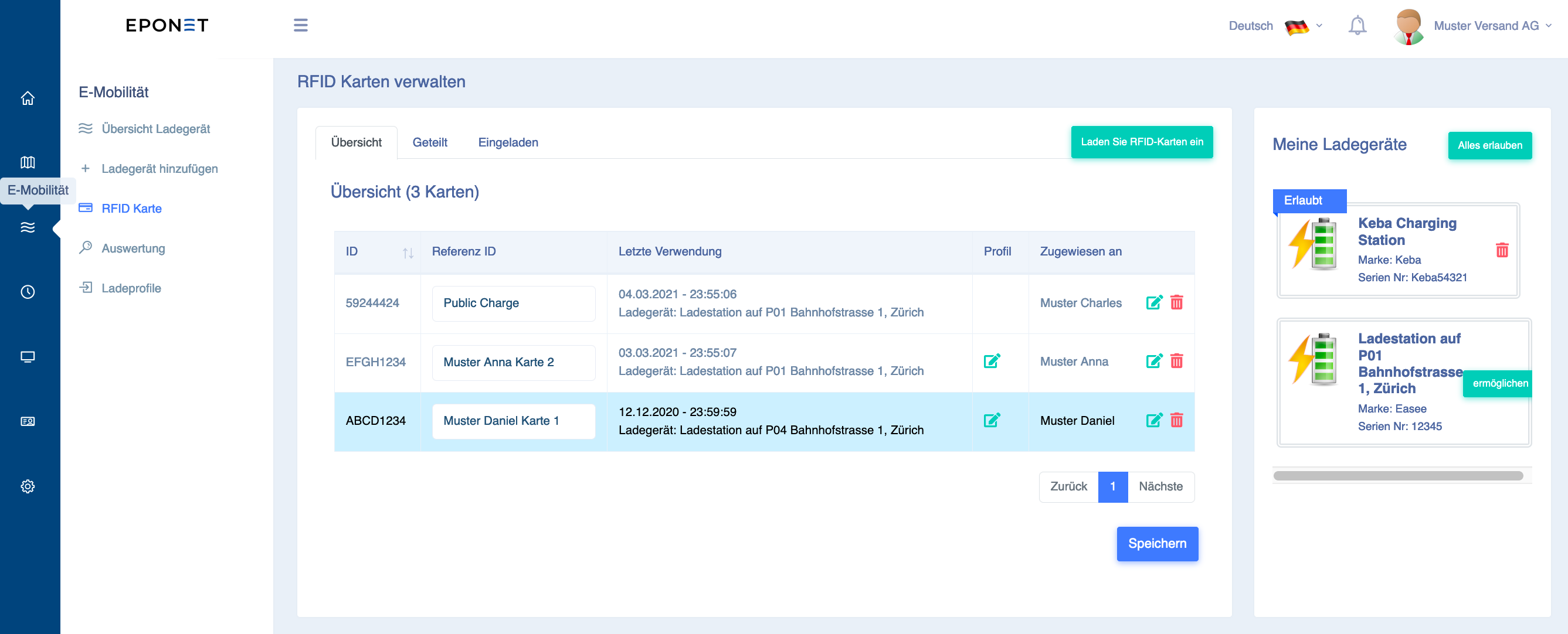
Bitte beachten Sie: Für die automatische Abrechnung, z.b. bei STWE oder Mieter wird der Benutzer über den grünen Knopf “Laden Sie RFID-Karten ein” eingeladen zu einem vorher definierten Ladeprofil. Hierzu gibt es eine seperate Anleitung für die Benutzer: https://www.eponet.info/download/anleitung/nutzer-account-konfiguration.pdf
Bitte führen Sie am Schluss zum Test einen Ladevorgang durch.
Tipp für Installationspartner die mehrere Eponet Kundenkonten verwalten:
Hinterlegen Sie Ihrem persönlichen Konto eine RFID Karte und laden Sie sich damit auf die Kundenkonten ein (ohne Ladeprofil, als Testkarte). Ob bei der Inbetriebnahme oder irgendwann später bei einem Supportfall, mit dieser RFID Karte können Sie immer alle Ladestationen zum Test freischalten.