
Exporting the data
Once chargers, meters and/or RFID cards have been recorded, you can set up the export of the data.
Carefully check that your metering codes and OBIS values have been entered correctly.
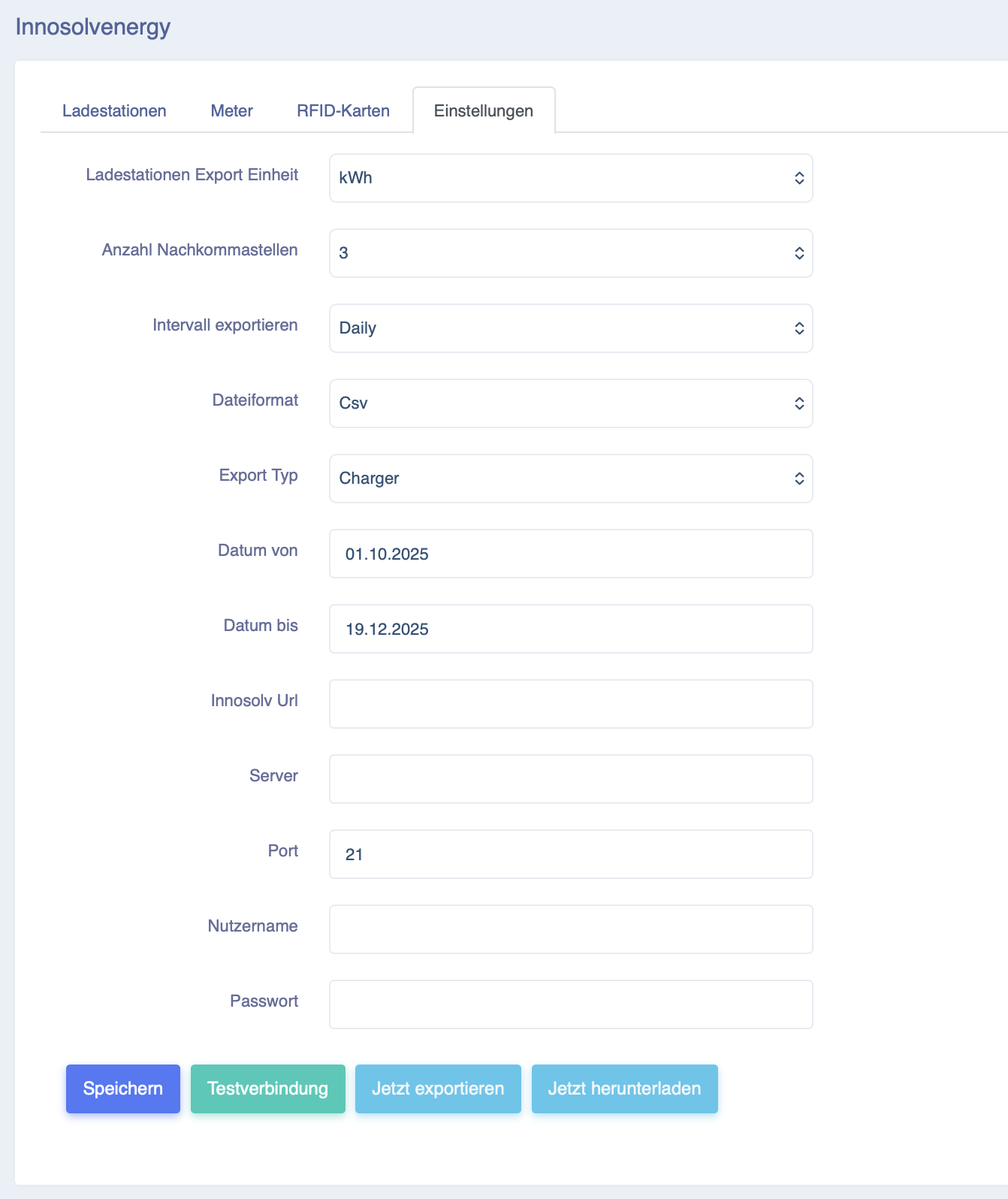
Charging station export unit: Select whether you want to export the data in Wh or kWh.
Number of decimal places: Select how many decimal places the values may contain.
Please note rounding differences. Charges are always calculated in the Eponet portal from the start of charging to the end of charging. It is therefore a simple stop value minus start value calculation. When exporting the data, however, the existing data is accumulated individually. This data itself may already contain rounding, which in turn can lead to small deviations in the overall result. However, these are minor. If at all, then on the 2nd or 3rd decimal place.
File format: XML or CSV, please note the description on the previous page.
Export type: Charger or RFID. For charging station data, select Charger. If you want to export to RFID cards, use RFID.
Date from/to: define the start and end period of the data to be exported.
Innosolv URL: Data can also be transferred directly as a POST request. Contact your Innosolv partner for the correct settings.
Server, port, user name, password: You can also write the data directly to an S/FTP server. Use these settings for this purpose.
With Test connection, you can check the connection to your S/FTP. Export
now generates the data and exports it to your S/FTP server.
Download now outputs the data as a download.